A STUDY DAY IN MITSKI'S GALLERY

Meet Mitski. She's going to show you how a study day works here.

Scroll. She'll fly ahead.

01DAILY PULSE

Morning. One plan, 45 minutes.

Your syllabus, your due recall, one interleaved concept — chosen for you.

Interleaving feels harder and works better — the struggle is the encoding.Clinical pearl · review pending

Open this in the app
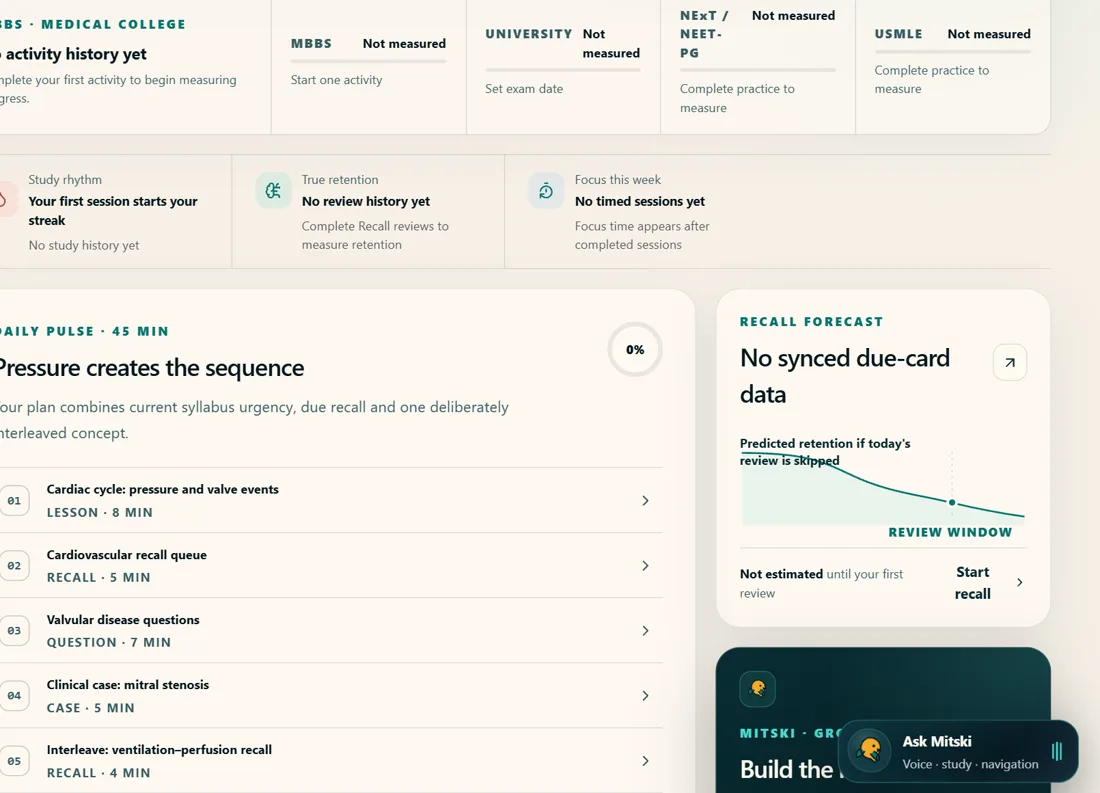
DAILY PULSE — real product screen
02RECALL

Cards that know when you'll forget.

FSRS spaced repetition — study less, keep more.

Practise retrieving an answer. FSRS estimates when another review is likely to help.Clinical pearl · review pending

Open this in the app
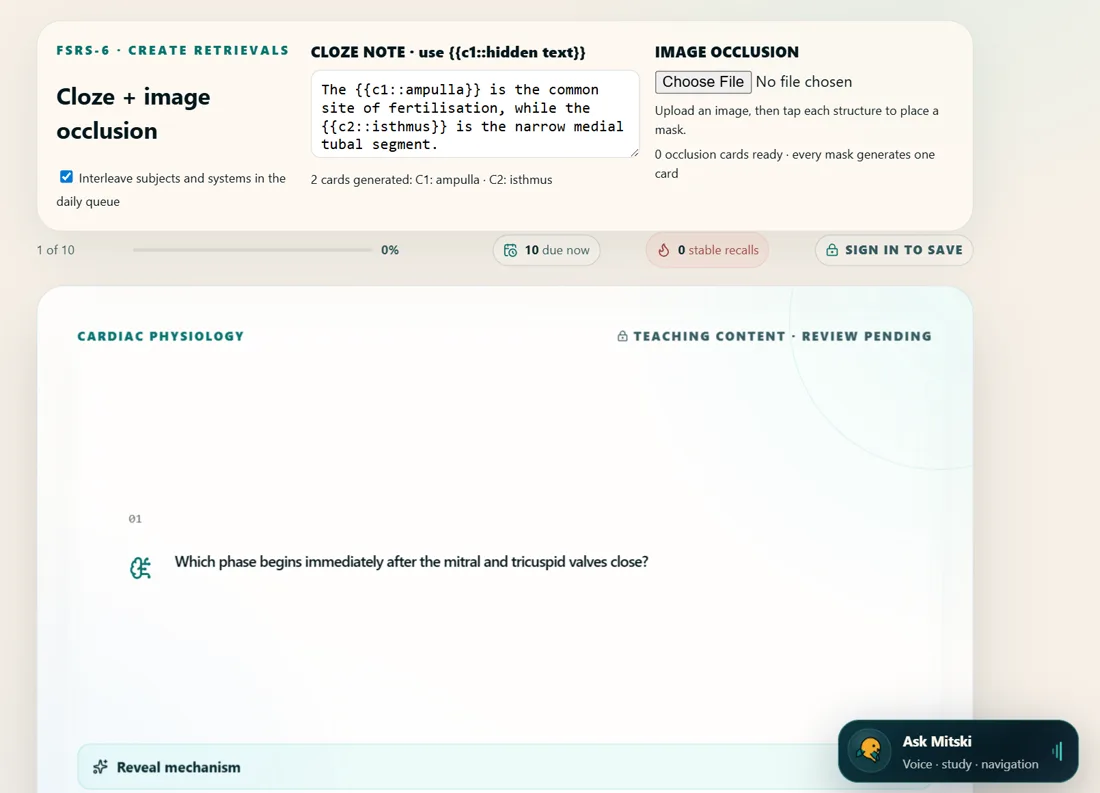
RECALL — real product screen
03CLINICAL STUDIO

Afternoon ward mind.

An AI patient answers. Every test costs. Commit before the reveal.

A committed wrong diagnosis teaches more than an uncommitted right one.Clinical pearl · review pending

Open this in the app
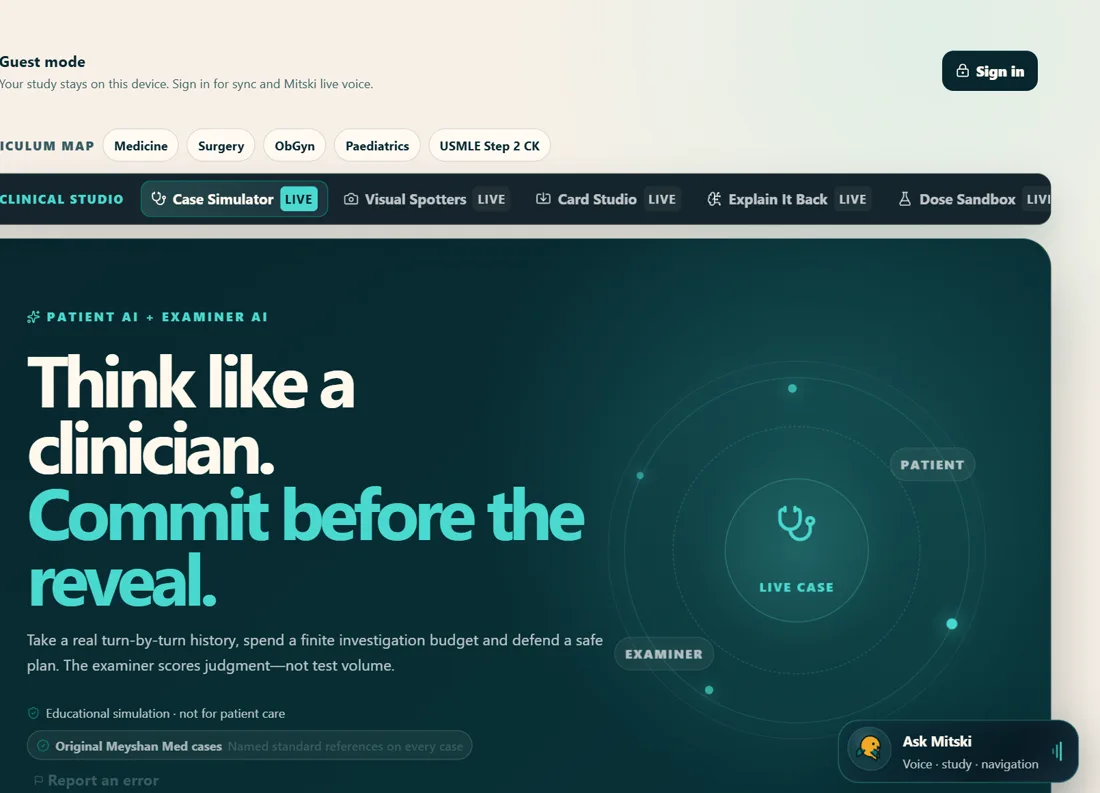
CLINICAL STUDIO — real product screen
043D CLINICAL ATLAS

Eleven organs you can hold.

Tap a structure, learn why it matters, quiz yourself on it.

Anatomy you've rotated is anatomy you can draw in the exam.Clinical pearl · review pending

Open this in the app
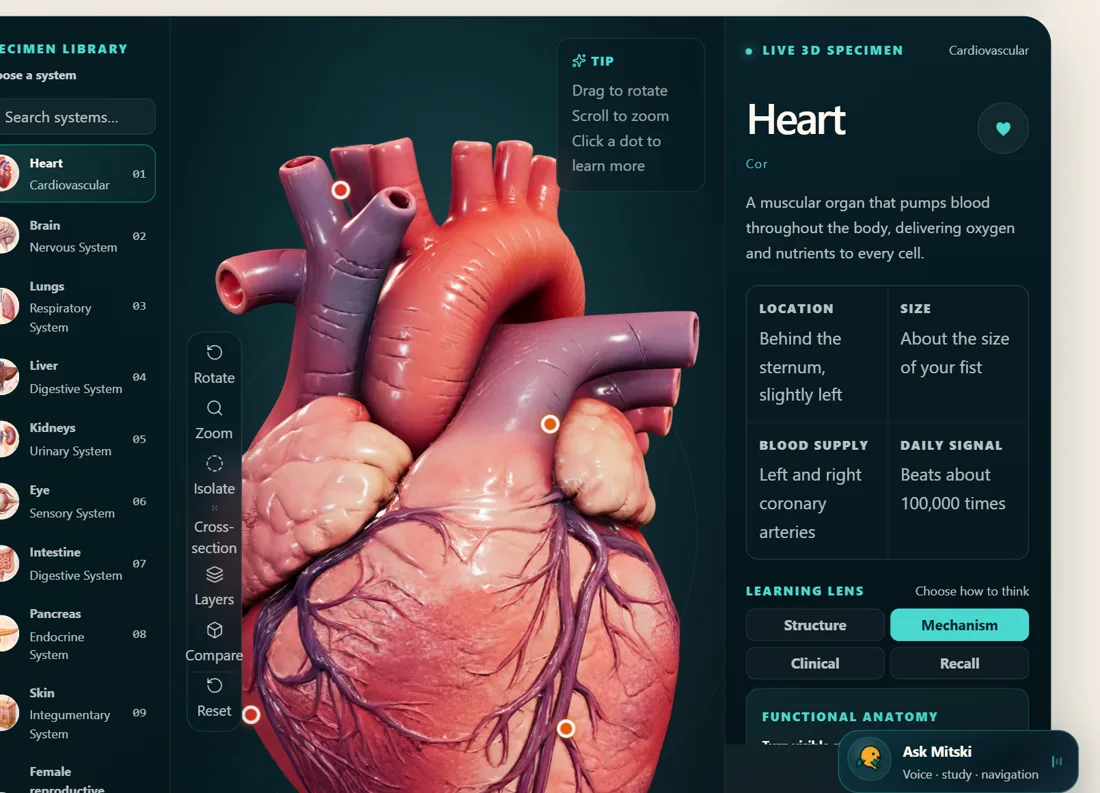
3D CLINICAL ATLAS — real product screen
05SPOTTER HALL

Practicals, simulated.

Station to station, one minute each — like the real hall, minus the fear.

Name the finding, then the significance — spotters mark the second half.Clinical pearl · review pending

Open this in the app
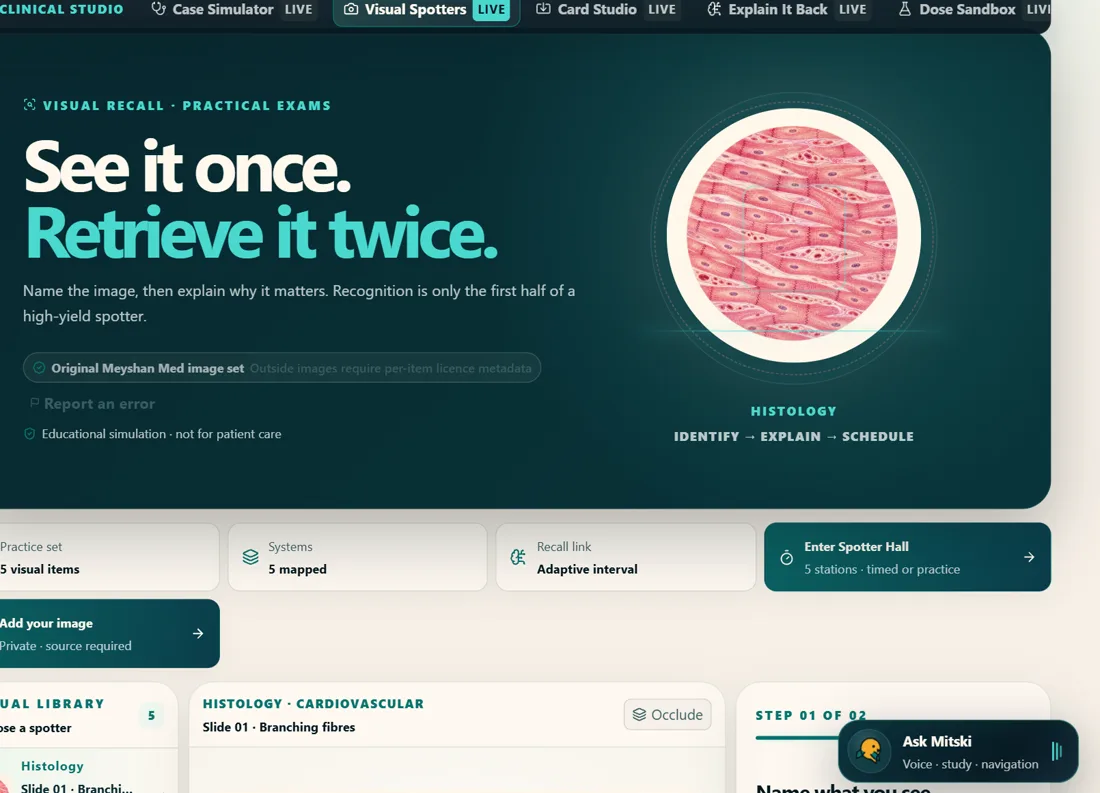
SPOTTER HALL — real product screen
06USMLE JOURNEY

Dreaming bigger?

The USMLE path, step by step — current, dated, official sources only.

Step 1 is pass/fail; Step 2 CK carries your score. Plan energy accordingly.Clinical pearl · review pending

Open this in the app
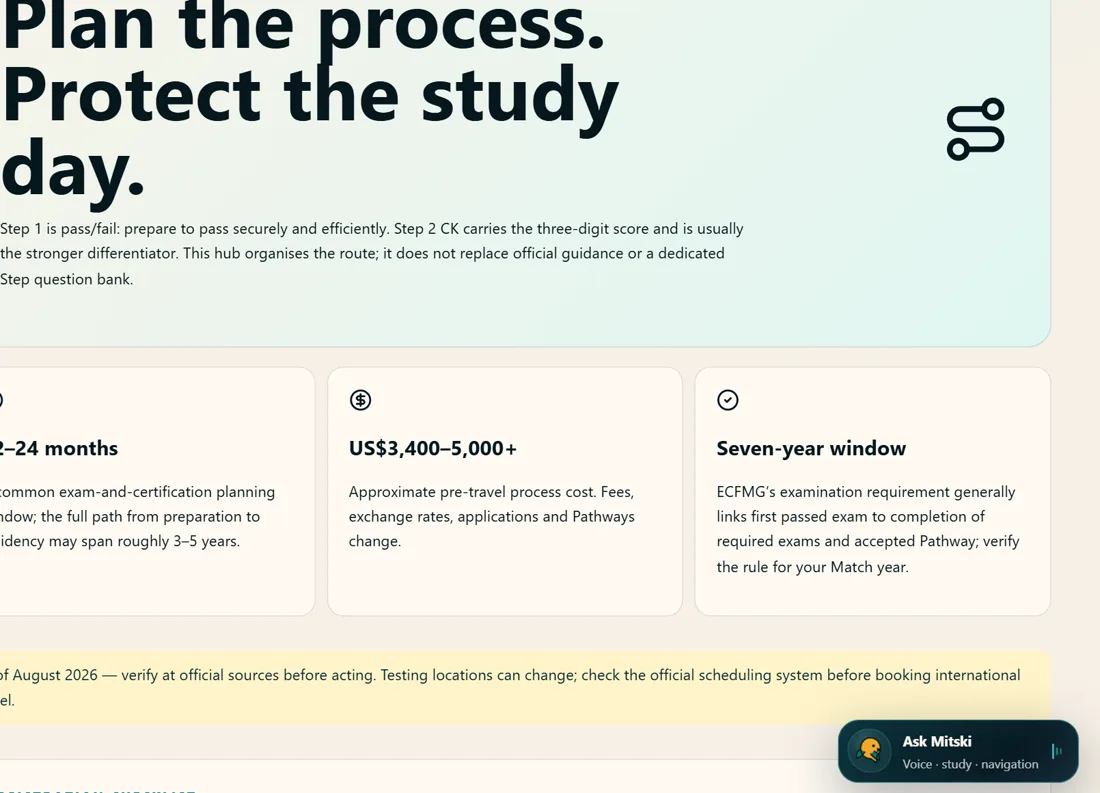
USMLE JOURNEY — real product screen
WHOLE DOCTOR

Evening. The last frame stays closed.

That one's your life outside study. She'll see you tomorrow.
THE MEYSHAN MASTERY LOOP

Seven steps, one loop — this is the whole identity

Every feature on this site is one arc of the same loop: find what actually broke, repair it from the foundation up, prove it by teaching it back, and let the recheck find you.

  1. 1DiagnoseShort confidence-tagged questions find what actually broke — not what feels broken.
  2. 2RepairLessons teach the deepest broken prerequisite first, one small concept per turn.
  3. 3TeachEvery turn ends in a check you must answer and stand behind — a lucky guess repairs nothing.
  4. 4AskStuck? Ask for a simpler analogy, a clinical case, or Hindi — the lesson adapts.
  5. 5Explain BackTeach it to an examiner or a patient; two different rubrics grade you honestly.
  6. 6Create RecallThe session collapses into an editable deck — 2-minute, 3-day, 1-week and exam-style cards.
  7. 7RecheckFSRS schedules the return visits, so forgetting is caught before the exam catches it.
OPEN THE MANUAL

The honest manual, module by module

How to use it, what actually powers it, where it can be wrong, and what happens to your data — four tabs per module, zero marketing.

Every module follows the same review process, built by Meyshan.

Daily PulseA study day sized to the time you actually have.

How to use it

Daily Pulse — real product screen
  1. 1Open Today and check the plan — it is already sized to the minutes you set in your Study Profile.
  2. 2Work through the activities in order; tick each one as you finish.
  3. 3Watch the completion ring close; finishing the last item ends the day with a small celebration.
  4. 4If your Weakness Ledger has entries, your two weakest concepts appear here — tap one to see the full ledger.

The tech behind it

The plan is assembled on your device from a pool of activity templates, filtered to fit your available minutes. No AI is involved in building the daily plan — it is deterministic, so the same profile always gets a fair, balanced day.

Limitations — read this

The plan currently draws on a cardiovascular-focused activity pool while the pilot runs — other systems arrive as content passes review.

Completion tracks what you ticked, not what you learned; the honest signal of learning lives in Recall and the Ledger.

Your data

Your plan progress and profile stay on this device in guest mode. Signing in syncs selected study progress so you can continue on another device. Nothing about your study content is sent to analytics.

RecallSpaced retrieval that predicts your forgetting.

How to use it

Recall — real product screen
  1. 1Open Recall and answer the cards that are due — say the answer before revealing it.
  2. 2Rate yourself honestly: Again, Hard, Good or Easy. The rating decides when the card returns.
  3. 3Use cloze and image-occlusion cards for anatomy — hide the labels, rebuild the map from memory.
  4. 4Cards you created in Card Studio and decks accepted from Lecture Rescue appear in the same queue.

The tech behind it

Scheduling runs on FSRS, an open-source spaced-repetition algorithm that estimates memory stability and difficulty. Reviews are scheduled when a memory is likely to be forgotten; this is an estimate, not an exact prediction. Every surface on the site that schedules review uses this one engine — there is no second scheduler anywhere.

Limitations — read this

FSRS optimises timing, not truth: rating yourself Easy on a wrong understanding schedules the error further away. The confidence buttons exist to catch exactly that.

A new deck needs a few days of honest ratings before the intervals become personal.

Your data

Guest review history lives in this browser's storage. Signed in, your review records sync privately so intervals follow you across devices.

Clinical StudioInterview a patient who does not know their diagnosis.

How to use it

Clinical Studio — real product screen
  1. 1Pick a case and a difficulty — the difficulty sets your time and investigation budget.
  2. 2Interview the simulated patient in plain language; order investigations that would change your mind.
  3. 3Commit to a diagnosis and a management plan BEFORE the reveal — commitment is where the learning happens.
  4. 4Read the examiner's rubric: history, efficiency, accuracy and safety are scored separately.

The tech behind it

The patient is played by an AI model that is given only what a patient would know — their story and symptoms, never the diagnosis. It cannot reveal what it does not have. Grading combines a deterministic rubric with AI assessment when you are signed in.

Limitations — read this

The patient is fictional and the encounter is a simulation — it is practice for reasoning, not a clinical reference.

AI grading can be imperfect; the deterministic rubric is the floor, and everything carries the educational-prototype notice.

Guest mode has a small daily allowance of patient turns; signing in raises it.

Your data

AI requests use store:false, but OpenAI may retain abuse-monitoring logs containing request and response content for up to 30 days by default, with longer retention possible for legal or safety reasons. Meyshan saves signed-in case results, including the diagnosis you enter, score and feedback; simulation state may also be saved on your device and in private account sync. Conversation text is excluded from analytics.

3D Clinical AtlasEleven organ systems you can hold and question.

How to use it

3D Clinical Atlas — real product screen
  1. 1Open an organ — it loads as an instant image first; tap to bring the full 3D model to life.
  2. 2Drag to rotate, scroll to zoom, tap a glowing dot to read about that structure.
  3. 3Run the labelling quiz: locate each structure, then say how certain you were — a lucky tap is not spatial knowledge.
  4. 4Anatomy words inside Lecture Rescue lessons are tappable and open the atlas at the right organ, with a one-tap way back.

The tech behind it

The models are real 3D meshes rendered in your browser with three.js — no plugins, no downloads beyond the model itself. The poster-first pattern keeps the page fast: zero 3D bytes load until you engage, and low-power phones stay on the still image by choice.

Limitations — read this

Models are teaching simplifications, not surgical references — small structures are exaggerated for legibility.

Older phones may cap resolution to protect the battery; the quiz works either way.

Your data

Quiz results and confidence tags feed your device's weak-signal ledger; missed structures schedule into Recall. The models themselves are static files — nothing about how you rotate them is recorded.

Spotter HallName what you see, then say why it matters.

How to use it

Spotter Hall — real product screen
  1. 1Choose a spotter image — histology, gross specimens, instruments and more.
  2. 2Step one: describe the finding in your own words. Step two: say why it matters clinically.
  3. 3Read the two-part score, see which discriminating words you captured and which to repair.
  4. 4Tag your confidence — a pass you guessed your way through stays in your weak signals.

The tech behind it

Your description is compared against expert keywords with an AI-assisted rubric: half the marks for the finding, half for its significance. Occlusion masks let you turn any image into recall practice.

Limitations — read this

Keyword matching rewards precise vocabulary — a right idea in vague words scores lower than it deserves; use the feedback to sharpen terms, not to argue with the meter.

Uploaded images must carry no patient identifiers, ever.

Your data

Scores and confidence tags stay on-device for guests and sync when signed in. Adding your own image requires sign-in: it is stored in your private Spotter library until you delete it and is never added to anyone else's library.

USMLE JourneyThe official process, one checklist at a time.

How to use it

USMLE Journey — real product screen
  1. 1Work down the checklist — each item is a real step in the ECFMG/USMLE process with its documents and fees.
  2. 2Tick what you have completed; the journey view keeps your place.
  3. 3Use the linked official sources for anything involving money or deadlines.

The tech behind it

A hand-maintained checklist — deliberately no AI. Process facts change on official sites first, so every step links out to the source.

Limitations — read this

Registration windows, fees and rules change without notice. ALWAYS confirm on the official ECFMG/USMLE sites before paying or booking anything — this checklist is a map, not the territory.

Your data

Your ticks stay on this device in guest mode and sync privately when signed in. Nothing here asks for your official IDs or documents.

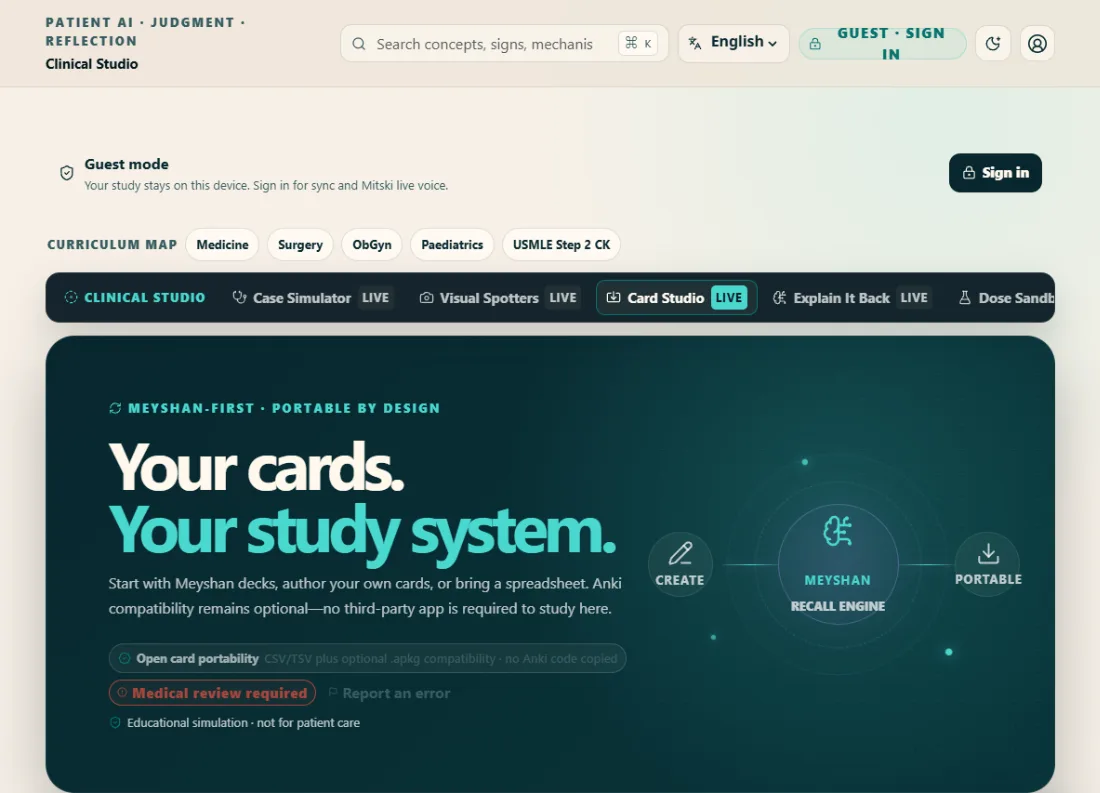
Card StudioYour cards, your decks — one scheduling brain.

How to use it

Card Studio — real product screen
  1. 1Create cards by hand, import decks (csv, tsv or Anki .apkg), or accept a generated "Rescue: topic" deck.
  2. 2Edit anything before it enters rotation — fronts, backs, tags.
  3. 3Export to csv whenever you want your cards elsewhere; they are yours.

The tech behind it

One card model feeds one FSRS scheduler. Imported Anki decks keep their review history where the format allows, so your intervals survive the move.

Limitations — read this

Complex Anki note types flatten to front/back on import — check a sample before importing a huge deck.

Generated rescue decks are unreviewed AI content until Meyshan checks them; the source label on each card says so.

Your data

Cards sync for signed-in students and stay local for guests. Export works either way — there is no lock-in by design.

Lecture RescueFor the lecture that went over your head.

How to use it

Lecture Rescue — real product screen
  1. 1Paste the section that lost you, pick a topic, photograph the page or board, upload a PDF chapter, or just say it aloud — everything lands in the same editable text box first.
  2. 2Answer 5–8 diagnostic questions and say how sure you were each time.
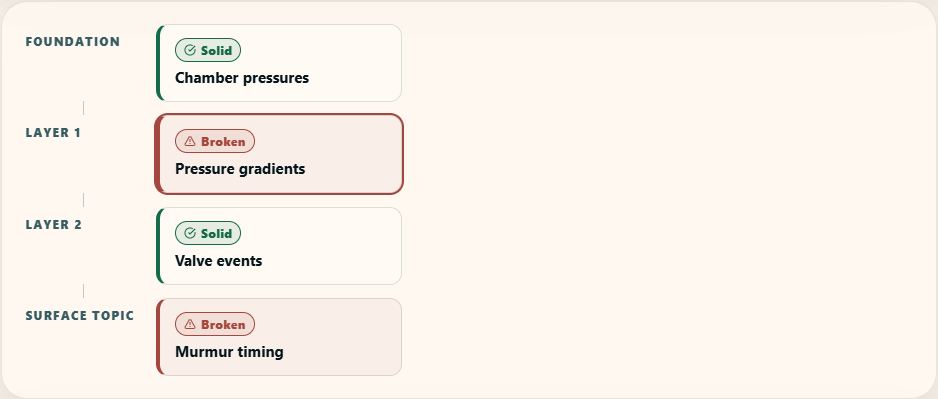
  3. 3Read your Confusion Map: green is held, amber is shaky, red is broken or blocking. Start at the deepest red.
  4. 4Pick a time budget — Emergency 5, Understand 15, Master 45 or Exam tomorrow — and repair, one concept per lesson.
  5. 5Explain it back to an examiner or a patient, then accept the recall deck the session built for you.

The tech behind it

An AI model reads your material section by section and extracts a concept graph — concepts and the prerequisite links between them, never a summary. Source Truth chips grade every claim: directly supported by your material, simplified by Meyshan, added context, or needs review. The time budget changes the structure of lessons, not their word count.

Limitations — read this

Everything generated here is unreviewed until Meyshan checks it — the chip on each block says exactly how much to trust it. Verify against your textbook before the exam.

A pasted section needs some mechanism in it; a bare list of headings cannot yield a prerequisite chain.

Photos and PDFs go through an AI reader: photos under 6 MB, PDFs under 15 MB. A chapter longer than the 24,000-character box comes back as its FIRST part with an honest note — trim to the section you need, or rescue the rest in another session.

Guests get one map a day with enough allowance to repair it; signing in raises the ceiling.

Your data

Meyshan does not write the original pasted lecture text to its application database. The generated map, questions, answers and lessons are saved on this device; cards you explicitly accept can also be saved to your signed-in Recall account. Meyshan records AI usage counters. OpenAI may retain request and response content in abuse-monitoring logs for up to 30 days by default, with longer retention possible for legal or safety reasons, even with store:false. Pasted text is excluded from analytics and shared libraries. Do not include patient identifiers.

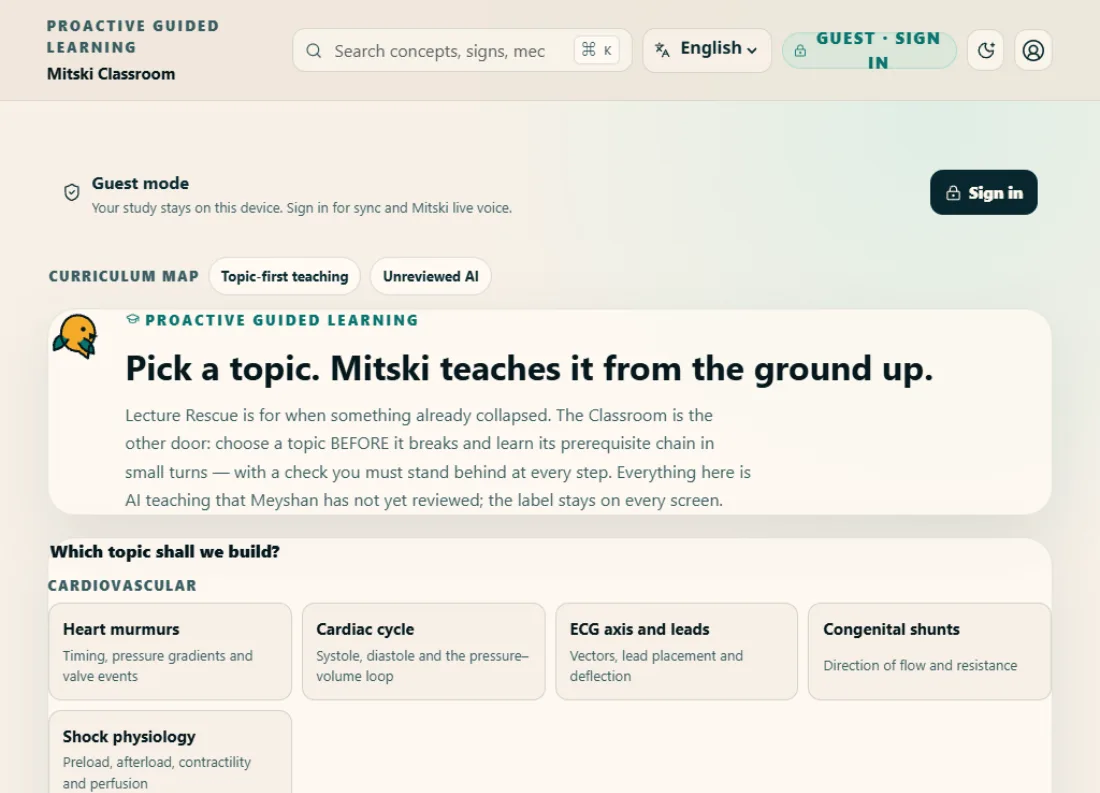
Mitski ClassroomLearn a topic before it breaks.

How to use it

Mitski Classroom — real product screen
  1. 1Pick the topic and the depth — Build it from the ground, Make it clinical, or Sharpen for the exam.
  2. 2Mitski teaches the prerequisite chain bottom-up, one small concept per turn.
  3. 3Every turn ends in a check you answer with stated confidence — a lucky guess is not knowledge.
  4. 4If a turn doesn't land, ask for a simpler analogy, a clinical example, or Hindi.
  5. 5The class closes with questions drawn from the same chain, and the session can be kept as a recall deck on your shelf.

The tech behind it

The Classroom is Lecture Rescue's engine pointed forwards: the same topic-graph extraction decides the chain, the same turn-based lessons teach it, and the same re-explanation styles adapt it. There is no second AI architecture — only a different entry: Rescue starts from your confusion, the Classroom starts from your curiosity.

Limitations — read this

Everything the Classroom teaches is AI output that Meyshan has not yet reviewed — the label stays on every screen. Verify against your textbook before the exam.

It shares the same daily study-AI allowance as Lecture Rescue: a deep class costs several lessons' worth.

Voice teaching is not part of this version.

Your data

Your check answers and weak signals stay on this device, with private account sync where supported. Meyshan records AI usage counters. Teaching requests use store:false, but OpenAI may retain request and response content in abuse-monitoring logs for up to 30 days by default, with longer retention possible for legal or safety reasons. Analytics excludes lesson text and the content of your answers.

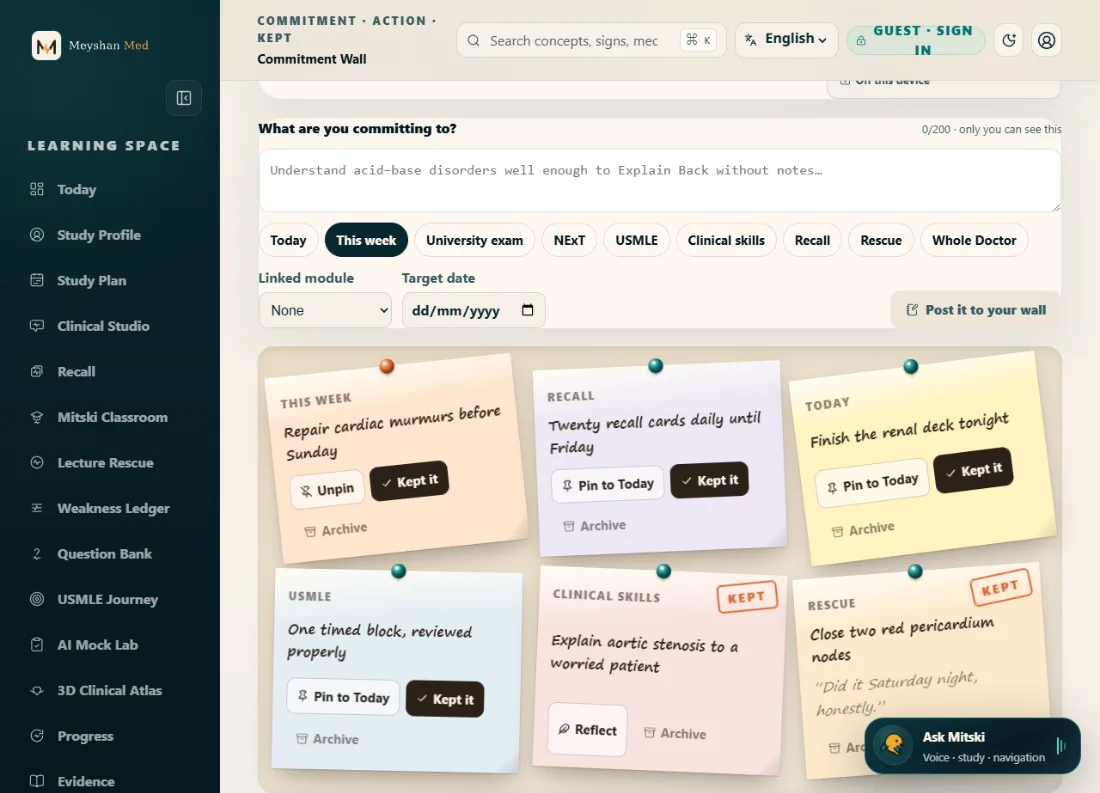
Commitment WallSay it to yourself, then keep it.

How to use it

Commitment Wall — real product screen
  1. 1Write a promise in your own words — “repair cardiac murmurs before Sunday” — and pick its category.
  2. 2Optionally link the module that will do the work and a target date, then post it to your wall.
  3. 3Pin the promise that owns today; it appears at the top of Today.
  4. 4Mark it kept only when it truly is, then add one honest line of reflection.
  5. 5Archive what no longer matters; restore it if it starts mattering again.

The tech behind it

The wall is deliberately simple technology: no AI anywhere in it. Completion is never inferred from your activity — the KEPT stamp is always your own hand, which is the point. The only metric is commitments kept.

Limitations — read this

It cannot verify a promise was really kept — it trusts you, because a wall you can cheat is a wall not worth having.

This version is private-only: there is no sharing, no Study Circle wall, and no leaderboard — none is pretended.

Your data

Commitments are private by design: stored on this device as a guest, synced privately when signed in. The text of a commitment or reflection never leaves for analytics — events carry category names only.

Question BankPractise the decision, not the wording.

How to use it

Question Bank — real product screen
  1. 1Pick your exam lens and system, answer, and tag how sure you were — confidence is the point.
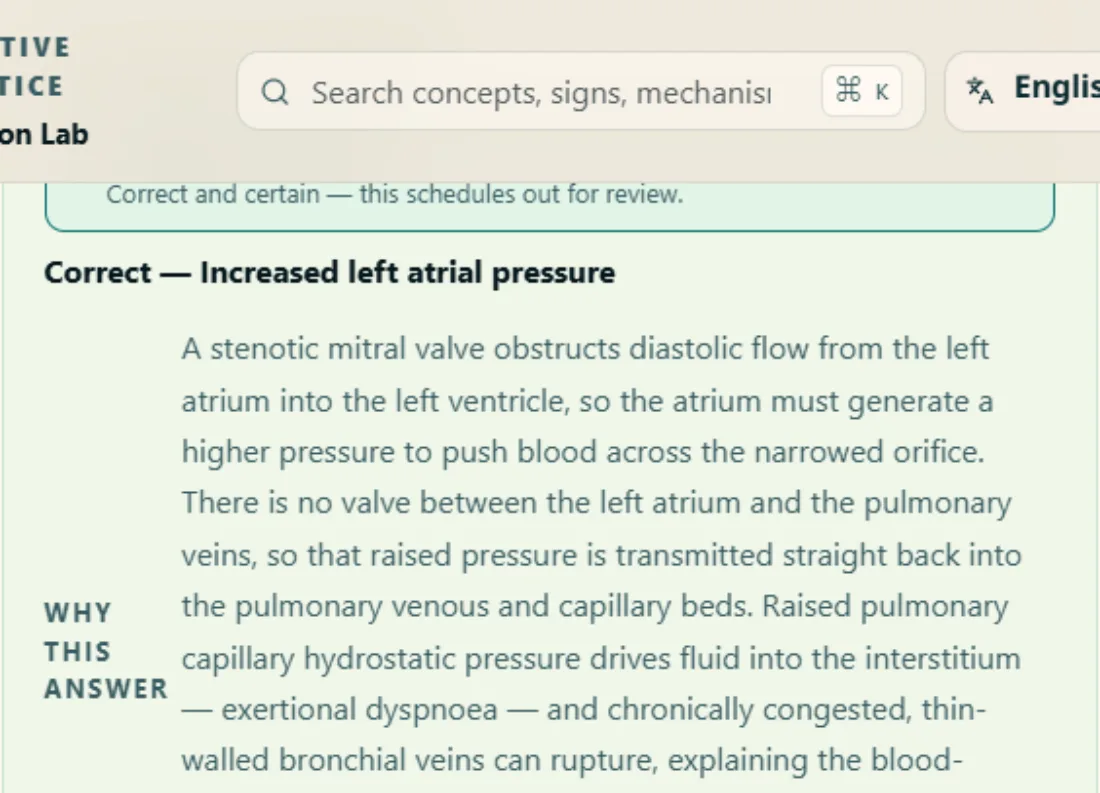
  2. 2Read the full explanation: why the right answer is right, and why EACH wrong option is wrong, with the real distinction.
  3. 3Where it helps, an option also tells you what change in the stem would have made it correct.
  4. 4A missed concept offers one-tap repair in Lecture Rescue; weak and guessed questions collect in your weak queue.
  5. 5Spotted a problem with a question? Report it in two taps — every report reaches the review desk.

The tech behind it

Every question is an original item on one canonical schema: stem, options, per-option distractor teaching, the underlying concept and its prerequisites, source basis and review status. New items pass an automated quality pipeline — structural checks, duplicate fingerprints, ambiguity heuristics — before a human ever reviews them, and nothing reaches students marked reviewed without Meyshan's own check.

Limitations — read this

The bank favours fewer excellent questions over volume — coverage grows through the quality pipeline, not bulk generation.

Explanations carry an academic-review-pending label until each item is individually reviewed.

Your data

Your answers, confidence tags and weak queue stay on this device as a guest and sync privately when signed in. A problem report sends the question id, the category you picked, and your optional one-line note to the review desk — analytics sees the category only.

THE MEYSHAN LEARNING MAP

What each part does — and how they hold each other up

Tap any module to see when to use it, what it feeds, and what it honestly cannot do. Every arrow is a real, shipped connection — not a diagram wish.

Today — your Daily PulsePlan the day

The adaptive home screen. It reads your real time budget, your due recall, and your recorded weaknesses, and lays out one honest study day — restructured, never just trimmed.

When to use it
Open it first. Tell it whether you have five minutes or a full evening, and let the day arrange itself.
How to use it
Set your available minutes, pick your focus system if you have one, and follow the plan top to bottom. Everything on it is one tap from starting.
Limitations
  • The plan is only as honest as the signals you give it — skipping confidence tags starves it
  • It cannot know about study done outside Meyshan
Your data
Your plan and minutes stay on this device as a guest; signing in syncs them privately to your account.
How it connects
  • Recall: Today puts your due recall cards at the front of the day.
  • Questions: Practice blocks on Today open straight into the Question Bank.
  • Rescue: A weak concept on Today is one tap from its own rescue.
  • Plan: Your exam-date plan decides what Today asks of you.
  • Ledger: Your two weakest concepts surface on Today when they're worth the time.
  • Recall: Due cards shape the day Today lays out.
  • Commitments: Pinned commitments appear at the top of Today.
Open Today Read its manual
Lecture RescueFind what broke

For the lecture that went over your head. Rescue maps what the topic sits on, finds the prerequisite that actually broke, and repairs it — deepest first — instead of summarising the topic back at you.

When to use it
When a topic collapsed and you don't know why. The murmur problem is usually a pressure-gradient problem.
How to use it
Paste the material, photograph the page, upload the PDF chapter, or just pick the topic. Answer five to eight diagnostic questions honestly — confidence included — then read your Confusion Map and repair from the deepest red.
Limitations
  • Everything it generates is AI output that Meyshan has not yet reviewed — the label says so on every screen
  • Extraction can miss tables and figures; you always see and edit the text before a map is built
  • Guests get one map a day
Your data
Meyshan does not save the original pasted lecture text to its application database. Generated maps, questions, answers and lessons stay on this device; accepted cards can sync to your account and AI usage counters are recorded. OpenAI may retain request and response content for abuse monitoring for up to 30 days by default, with longer retention possible for legal or safety reasons.
How it connects
  • Today: A weak concept on Today is one tap from its own rescue.
  • Ledger: Concepts you answered weakly in a rescue enter your Weakness Ledger.
  • Recall: A finished rescue collapses into an editable deck that Recall schedules.
  • Atlas: Anatomical terms in repair lessons open the matching 3D organ.
  • Questions: A missed concept offers a one-tap Lecture Rescue built beneath it.
  • Ledger: “Rescue this” builds a Confusion Map beneath the exact weak concept.
  • Manual: Every manual panel links into the module it documents.
  • Commitments: A linked commitment starts its work directly in the module you chose.
Open Rescue Read its manual
Recall — spaced review that keeps what you wonKeep what you won

Card review scheduled by FSRS, an open-source spaced-repetition algorithm. Reviews are scheduled when a memory is likely to be forgotten, using an estimate rather than an exact prediction.

When to use it
Daily, in short honest sessions — it beats a weekend binge every time the exam checks.
How to use it
Open your due queue and grade yourself truthfully. Rescue decks, Card Studio cards and Anki imports all live here.
Limitations
  • Scheduling is only as good as your honesty when grading
  • A new card's first interval is a guess the algorithm refines
Your data
Guest cards stay on this device; signed-in cards sync privately. Nobody else sees your review history.
How it connects
  • Today: Today puts your due recall cards at the front of the day.
  • Rescue: A finished rescue collapses into an editable deck that Recall schedules.
  • Today: Due cards shape the day Today lays out.
  • Ledger: The Ledger shows when a weak concept's cards come back for review.
  • Classroom: A finished class can be kept as a recall deck on your shelf.
Open Recall Read its manual
Weakness LedgerKeep what you won

Every weak or guessed answer from across the workspace, on one page — with the receipts. Anything repaired disappears on its own.

When to use it
When you want to study what is actually weak instead of what feels weak.
How to use it
Scan your signals grouped by system, then tap “Rescue this” on the one that matters — a Confusion Map is built underneath that exact concept.
Limitations
  • It records what you attempted — untouched topics can't be weak yet, only unknown
  • Repair means answering correctly with confidence, not re-reading
Your data
Your weaknesses are yours alone: on-device for guests, privately synced when signed in, never public.
How it connects
  • Rescue: Concepts you answered weakly in a rescue enter your Weakness Ledger.
  • Questions: Missed and guessed questions record their concepts in the Ledger.
  • Clinical: Weak moments with the AI patient land in your Ledger.
  • Atlas: Atlas location checks record confidence-tagged signals.
  • Rescue: “Rescue this” builds a Confusion Map beneath the exact weak concept.
  • Today: Your two weakest concepts surface on Today when they're worth the time.
  • Recall: The Ledger shows when a weak concept's cards come back for review.
  • Classroom: A check answered weakly in class lands in your Weakness Ledger.
Open Ledger
Question BankPractise the decision

Original clinical questions that grade the decision, not the wording — every answer records accuracy AND confidence, and every wrong option teaches its own distinction.

When to use it
After understanding a topic, to pressure-test it the way an exam will.
How to use it
Pick your exam lens and system, answer, tag your confidence, then read why the right answer is right and why each wrong option is wrong. Miss something? One tap repairs the concept in Rescue.
Limitations
  • The bank favours fewer excellent questions over volume — coverage grows through a quality pipeline with human medical review
  • Explanations carry an academic-review-pending label until Meyshan reviews each item
Your data
Your answer history stays on this device as a guest and syncs privately when signed in.
How it connects
  • Today: Practice blocks on Today open straight into the Question Bank.
  • Ledger: Missed and guessed questions record their concepts in the Ledger.
  • Rescue: A missed concept offers a one-tap Lecture Rescue built beneath it.
  • Mastery: Recorded practice moves your Mastery Map.
Open Questions Read its manual
Clinical StudioPractise the decision

Reason through simulated patients who answer like patients — commit to a diagnosis, defend it, and get graded feedback. Spotter Hall drills image recognition alongside.

When to use it
When the theory is in and you need to practise the conversation and the commitment.
How to use it
Take the history in your own words, order your reasoning, commit, then read the structured feedback. Weak moments land in your Ledger.
Limitations
  • An educational simulation, never clinical advice and never a substitute for real patients
  • Guest conversations are capped per day; the patient stays within its brief
Your data
Conversations are processed per turn and not retained by the AI provider; your case log stays private to you.
How it connects
  • Ledger: Weak moments with the AI patient land in your Ledger.
Open Clinical Read its manual
3D Anatomy AtlasSee it

Real-time 3D organs you can turn, section and question — with confidence-tagged checks that feed your Ledger like every other surface.

When to use it
When a structure won't sit still in your head — see it, rotate it, then prove you can place it.
How to use it
Pick an organ, explore the views, and take the location checks. Rescue lessons deep-link here when an anatomical term matters.
Limitations
  • Models are teaching simplifications, not surgical references
  • 3D loads only when you engage it, and older phones get the lighter path
Your data
Exploration is anonymous; only your quiz outcomes are kept, privately, like every other signal.
How it connects
  • Rescue: Anatomical terms in repair lessons open the matching 3D organ.
  • Ledger: Atlas location checks record confidence-tagged signals.
Open Atlas Read its manual
AI Mock LabPractise the decision

Full mock papers built from your own PDFs — theory and practical formats, grounded in the material you actually study from.

When to use it
Before a university exam, when you want the paper rehearsed and not just the topics.
How to use it
Upload the source PDF, choose the format and length, sit the paper, and review the marked answers.
Limitations
  • Generated questions inherit the quality of the source PDF and carry the standard unreviewed-content label
  • Long PDFs are trimmed to what one paper can honestly cover
Your data
Your PDF is processed for the paper you asked for and is not kept after the request.
Open Mock Lab
Study PlanPlan the day

Backwards planning from your real exam dates — the plan divides what remains by the days that remain, honestly.

When to use it
At the start of a posting or an exam runway, and whenever the dates move.
How to use it
Enter the exam dates and your weekly rhythm; the planner lays the weeks out and Today follows them.
Limitations
  • A plan is a promise you make yourself — the planner cannot sit the chair for you
Your data
Plans stay on-device for guests and sync privately when signed in.
How it connects
  • Today: Your exam-date plan decides what Today asks of you.
Open Plan
Mastery MapPlan the day

The dual-curriculum view: your university syllabus and your entrance-exam syllabus on one map, so progress in one visibly counts for the other.

When to use it
Weekly, to see where you actually stand across both curricula.
How to use it
Scan the systems, find the thin patches, and take the gaps to Rescue or the Question Bank.
Limitations
  • It reflects recorded work — outside reading doesn't move it
Your data
Your progress picture is private to you, like every signal that builds it.
How it connects
  • Questions: Recorded practice moves your Mastery Map.
Open Mastery
USMLE JourneyPlan the day

The honest long-route map for an Indian MBBS student considering USMLE — stages, costs, timing, and how daily Meyshan work feeds Step-style reasoning.

When to use it
When you're deciding whether the American route is yours, or planning its years.
How to use it
Read the stages, weigh the costs, and connect your current study habits to the reasoning style Step exams reward.
Limitations
  • Guidance, not immigration or career advice — verify dates and fees at the official sources it names
Your data
A public reference page; nothing about you is collected by reading it.
Open USMLE Read its manual
Evidence DeskUnderstand it

Source-grounded reading: bring a claim or a topic and read it against real material with the source visible.

When to use it
When a claim needs a source, not a vibe.
How to use it
Ask with the material in view and read the grounded response next to its basis.
Limitations
  • Grounding is only as good as the supplied source; it will say so rather than invent
Your data
Queries are processed per request and your reading history stays private.
Open Evidence
Mitski · Whole DoctorAlongside you

Mitski, the sun conure, is the human side of the workspace: she explains screens, helps decide what to study next, keeps an eye on rhythm and rest, and celebrates consistency.

When to use it
When you're lost, tired, or deciding what deserves the next hour.
How to use it
Type to her anywhere; sign in for live voice. The Whole Doctor view keeps wellbeing check-ins beside the study tools.
Limitations
  • Mitski never gives clinical advice — that boundary is fixed
  • Voice needs a signed-in session
Your data
Conversations are processed per turn and not used to profile you; wellbeing check-ins stay on your device.
Open Mitski
Mitski ClassroomUnderstand it

Proactive guided learning: pick a topic before it breaks and Mitski teaches its prerequisite chain from the ground up, one small concept per turn, each ending in a check you stand behind.

When to use it
Before a topic collapses — when tomorrow's lecture assumes a chain you never built. Rescue is for after; the Classroom is for before.
How to use it
Choose the topic and the depth (foundations, clinical, or exam-sharp). Read each turn, ask for an analogy, a clinical example or Hindi when it doesn't land, and answer the check honestly.
Limitations
  • Everything it teaches is AI output pending Meyshan's review — the label stays on every screen
  • It shares the same daily study-AI allowance as Lecture Rescue
  • Voice teaching is not part of this version
Your data
Your checks and weak signals stay on-device, with private account sync where supported. Meyshan records AI usage counters. Teaching requests use store:false, but OpenAI may retain request and response content for abuse monitoring for up to 30 days by default, with longer retention possible for legal or safety reasons. Answer text is excluded from analytics.
How it connects
  • Ledger: A check answered weakly in class lands in your Weakness Ledger.
  • Recall: A finished class can be kept as a recall deck on your shelf.
Open Classroom Read its manual
Commitment WallPlan the day

A private wall for your study promises: commit in your own words, act, mark it kept when it truly is, and reflect. The only metric is commitments kept — counted by your own hand.

When to use it
When a week needs a spine: name the two or three things that actually matter and post them where you'll see them.
How to use it
Write the promise, pick its category, optionally link the module that will do the work and a target date. Pin the one that owns today. Mark it kept only when it is.
Limitations
  • Completion is always your own hand — the wall never infers progress from activity data
  • Private-only in this version: no sharing exists yet, so none is pretended
Your data
Commitments are private to you: on this device as a guest, privately synced when signed in. There is no leaderboard and no public wall.
How it connects
  • Today: Pinned commitments appear at the top of Today.
  • Rescue: A linked commitment starts its work directly in the module you chose.
Open Commitments Read its manual
How it works — the honest manualUnderstand it

Every module documented in four honest tabs: how to use it, the tech behind it, its limitations, and what happens to your data. Plus the Mastery Loop — the spine the whole site hangs on.

When to use it
Before trusting any tool with your exam — read what it can and cannot do.
How to use it
Open a module's manual panel; deep links land on exactly the right one. It works without JavaScript.
Limitations
  • The manual documents what is shipped — features it doesn't mention don't exist
Your data
A public page; reading it collects nothing about you.
How it connects
  • Rescue: Every manual panel links into the module it documents.
Open Manual
QUESTIONS

Before you start

Is Meyshan Med free?

Yes. Meyshan Med is free to use — it's built and maintained by a medical student, not sold as a subscription product.

Who is Meyshan Med for — MBBS, NExT or USMLE?

All three. It's one study system that connects college MBBS study, NExT preparation and USMLE-style clinical reasoning, rather than treating them as separate apps.

Is it safe to rely on AI-generated explanations?

Every AI-drafted explanation, question or lesson is labelled unreviewed until a medical student checks it for factual accuracy and exam relevance. You always see which state a piece of content is in — see the full review methodology for the exact process.

Does Meyshan Med work with a weak connection?

It installs as an app on your phone and caches the pages you've opened, so a patchy hostel connection doesn't lock you out mid-session. Rescue and Classroom decks you keep are revisable on-device from the Recall shelf even with the connection gone.

What is the difference between Lecture Rescue and the Mitski Classroom?

Direction. Lecture Rescue is remediation: you bring a lecture that already collapsed and it diagnoses the broken prerequisite underneath. The Mitski Classroom is the same engine pointed forwards: pick a topic before it breaks and Mitski teaches its prerequisite chain from the ground up, one small checked turn at a time.

What is the Commitment Wall?

A private wall for study promises in your own words — commit, act, mark it kept when it truly is, and reflect. The only metric is commitments kept, counted by your own hand. It is private by default and there is no leaderboard.

Do Question Bank explanations cover the wrong options too?

Yes — every question explains why the right answer is right and why each wrong option is wrong, with the actual distinction, and often what change in the stem would have made that option correct. If an explanation still fails you, report it in two taps and it lands on the review desk.

Who builds and reviews the content?

Meyshan Med is built independently by a medical student. Content follows a visible source-and-review process before it reaches students — read the founder's story and the review methodology for specifics.

What is the Meyshan Mastery Loop?

The seven-step cycle every feature on the site is one arc of: diagnose what actually broke, repair the deepest broken prerequisite first, prove you understood it by explaining it back, then use spaced recall, scheduled when a memory is likely to be forgotten.

Explore a learning topic